
Editorial team · Robotics, Automation, Industrial IT
 InfoWeb Marketplace · Editorial team
Published on 11 December 2012 · 4 min read
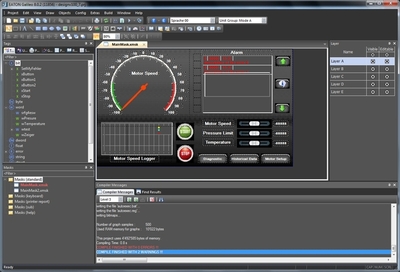
Galileo 8.0 visualization software: the best of visualization
InfoWeb Marketplace · Editorial teamPublished on 11 December 2012 · 4 min read
The manufacturer Eaton Corporation offers terminals/controllers perfectly suited to use in machine and plant construction.
Eaton's touchscreen terminals provide instructions via clear, customizable menus in all the languages required.
Control, regulation, positioning and fieldbus communication operations are programmed using the Xsoft-CoDeSys-2 software.
The user interface can be created via Galileo, Eaton's user-friendly visualization software. This allows manufacturers to sell their machines anywhere in the world while producing a single hardware and software solution.
The **Galileo visualization software** includes various functions for programming all of the graphic terminals (controllers/terminals) from Micro Innovation/Eaton.
One of the software's main strengths is its ease of use. Highly intuitive, it requires only a short training time.
The ready-to-use functions and numerous graphic objects make it possible to design the visualization on the terminals to meet requirements precisely.
The Inspector preview function makes it possible to simulate the results as early as the design phase.
The latest version of the software includes numerous graphic objects. Thanks to various interface styles, the user can position objects on different levels and create custom data types.
The software is highly compatible, offers backward compatibility for projects and runs on all WinCE terminals.
Several languages are available, and the user benefits from a country-specific keyboard layout for data entry. All Unicode characters are supported, including Asian characters.
The language and value scales can be changed at runtime. With nearly 150 communication protocols, Galileo is also compatible with common protocols such as Siemens Simatic, Rockwell PLC and ControlLogix, Omron, CoDeSysV2/V3, Eaton Easy, etc.
Eight communication channels can be created in parallel and data can be synchronized easily.
The user interface is created using objects. These are placed on different levels and freely arranged. For greater ease of use of the interface, the user can adjust the transparency of objects whose positioning is static or dynamic. The size and position of a dynamic object can be modified later and access to it can be controlled.
The **Galileo visualization software** includes various functions for programming all of the graphic terminals (controllers/terminals) from Micro Innovation/Eaton. One of the software's main strengths is its ease of use. Highly intuitive, it requires only a short training time.
The ready-to-use functions and numerous graphic objects make it possible to design the visualization on the terminals to meet requirements precisely. The Inspector preview function makes it possible to simulate the results as early as the design phase.
The latest version of the software includes numerous graphic objects. Thanks to various interface styles, the user can position objects on different levels and create custom data types.
The software is highly compatible, offers backward compatibility for projects and runs on all WinCE terminals. Several languages are available, and the user benefits from a country-specific keyboard layout for data entry.
All Unicode characters are supported, including Asian characters. The language and value scales can be changed at runtime. With nearly 150 communication protocols, Galileo is also compatible with common protocols such as Siemens Simatic, Rockwell PLC and ControlLogix, Omron, CoDeSysV2/V3, Eaton Easy, etc. Eight communication channels can be created in parallel and data can be synchronized easily.
The user interface is created using objects. These are placed on different levels and freely arranged. For greater ease of use of the interface, the user can adjust the transparency of objects whose positioning is static or dynamic. The size and position of a dynamic object can be modified later and access to it can be controlled.
**Eaton** provides several basic objects for visualization. The user thus has buttons, switches and sliders for designing the terminal interface.
The software also includes more powerful objects, such as a dial instrument with smooth outer edges (anti-aliasing).
Another object is intended for error management: it provides a timestamp for errors, classifies them by type and keeps a history. Error messages with a placeholder are also available. In the event of an error, this placeholder can be filled with a variable value or a project text.
A comprehensive user management function can also be integrated into the terminal design.
This function makes it possible to add and remove user rights and assign users to predefined groups.
Minimum password length, password history and age, as well as initial passwords, an automatic logout function and monitoring of invalid login attempts can be defined to ensure system protection. Another available object is the parameter list. It displays variables as a list and allows them to be modified.
Recipe management makes it possible to change the parameters for two different manufacturing processes.
The predefined recipes contain all the necessary production parameters. Very comprehensive, Eaton's Galileo software offers performance at least comparable to competing products.
Its great ease of use and intuitive operation considerably simplify use. One of its main strengths is its high degree of compatibility with a large number of controllers. Machine builders using Galileo can thus opt at any time for an Eaton operator terminal with integrated PLC.
Advertisement