
Programming robots in no time: Handguiding with KUKA ready2_pilot
 InfoWeb Marketplace · Editorial team
Published on 30 April 2021 · 2 min read
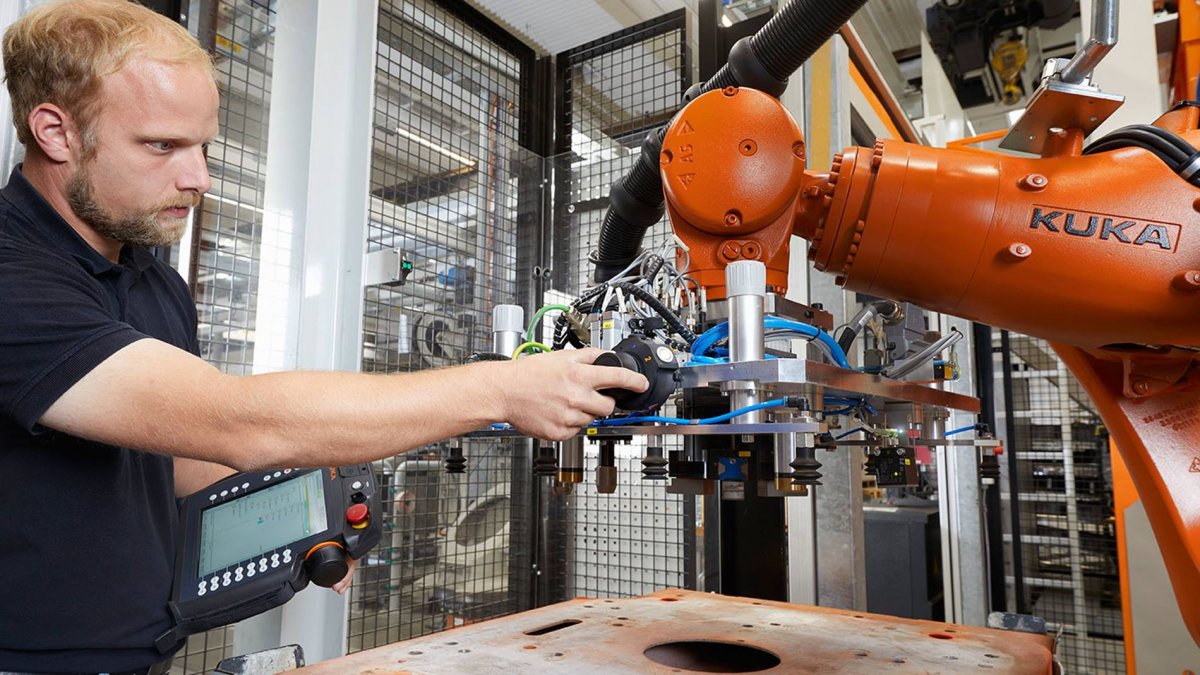
Automation brings a great many advantages for companies, particularly for dangerous, tiring or monotonous tasks. Programming often remains the problem to be solved. How can you easily teach the mechanical assistant what it has to do? Through manual guidance: KUKA ready2_pilot solves this problem.
The application scenarios for using robots in companies are countless: welding, drilling and gluing are just three examples of tasks that machines can perform with speed, endurance and consistently high quality. However, automation also means digitalization. Indeed, the use of robots in industry rarely concerns the device alone. The robot controller and software are also affected. For many companies, this represents a major challenge. According to a survey by the industry association Bitkom and the German Confederation of Skilled Crafts (ZDH), 81 percent of the companies surveyed are open to innovation, but 64 percent admit to having reservations about digital technologies.
Manual guidance instead of complex programming
The main obstacle to the widespread adoption of robots is often the control system. Potential users believe they have to invest heavily in training and personnel, which is why they often reject a robotic solution. The solution to this challenge is called ready2_pilot from KUKA. Following the principle of ?easy programming?, this solution is aimed above all at companies without particular experience in robot programming.
Handguiding - teaching robots by manual guidance
To do this, the employee guides the robot manually along a workpiece using the ?Commander?, a kind of 6D mouse, and ?shows? it what it has to do. Via the wireless connection to the control device, the movements are converted into instructions that can then be modified or supplemented as desired. This makes it possible to record tasks very quickly and to program them literally in no time.
Teaching the robot by hand as if you were performing the task yourself
The ?Commander? serves as an aid. It is a control head similar to the 6D mouse on the KUKA smartPAD that can be moved in all directions and also detects forward and backward instructions. The Commander is mounted quickly and directly on the robot and responds very sensitively. In this way, tasks can be performed directly on the workpiece. The great advantage is that even less experienced people quickly get used to the robot and simply ?give? it tasks without the need for extensive training or certificates. In addition, the Commander is multifunctional. It can be used in the same way with all types of robots. The investment is therefore amortized in a very short time.
