

Editorial team · Robotics, Automation, Industrial IT
 InfoWeb Marketplace · Editorial team
Published on 19 December 2019 · 2 min read
To continue developing a high-performance digital ecosystem that is both intelligent and fully connected, Hexagon has just released the new version of its ISO code simulation software NCSIMUL, part of its range of production software.
The development team has focused its efforts on three main areas concerning toolpath verification for a collision-free result and the automatic conversion of machining programs from one machine to another:
- Optipower
- The interface
- 4CAM.
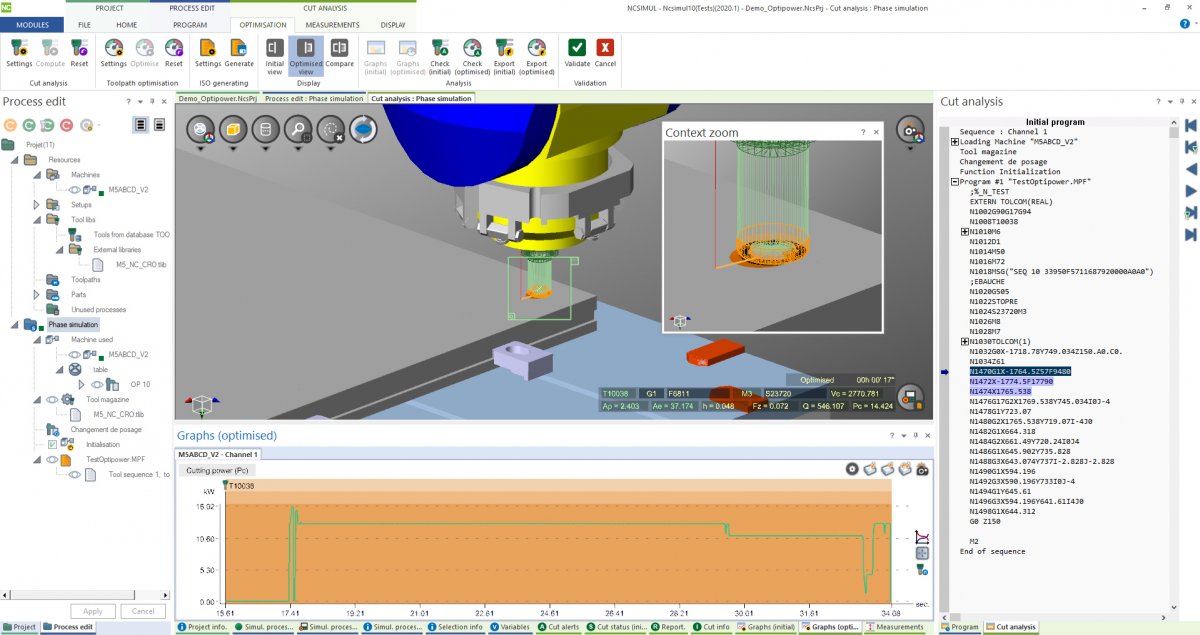
To help manufacturers keep pace with the philosophy of Industry 4.0, NCSIMUL 2020.1 introduces a new parameter in the NCSIMUL Machine module. Optipower complements the Optitool module and makes it possible to visualize, during milling cuts, the power and torque required for material removal.
Philippe Legoupi, Technical Director, explains its use as a limiting parameter to optimize the program and limit power in order to avoid the risk of tool breakage. ?Optipower takes into account the type of material, the selected tool and the definition of the angles.? A graph shows the change in the power applied to the tool, which can be used to limit the possibility of bending, overheating and premature deterioration.
The interface has been improved through two major developments that are particularly useful for program optimization. ?The aim is to save time thanks to automated functions and to provide an improved, clearer overview of the work thanks to more efficient navigation.? First, a 'Graphic Window' has been added, allowing users to zoom in on a specific tool instead of being limited to a simple overall view. ?Selections are saved in the project window; even if you need to look at another part of the program, the focus created on the selected tool is saved in the project. In addition, the background color of the graph matches that of the toolpath in the 3D view, which is handy for getting a clear picture of the machining process at a glance.?
Next, an option makes it possible to select a specific sequence in the tree structure. ?The F7 key allows users to go to the chosen location in the program, in the desired window. The milling sequence window is linked to the project tree structure, allowing users to navigate freely from one to the other. It is a very useful option because it makes it possible to switch quickly and easily from the 3D view of the program to the navigation tree and vice versa.?
- Handling of native polar toolpaths on turning/milling machines
- A new link for head/head machines and a rotation change for safer positioning
- Duplication of the axis system
- A more realistic rendering with better visual quality, without slowing down the process.
In summary, NCSIMUL builds the optimized digital twin of the real manufacturing environment. It thus makes it possible to eliminate errors, secure production, reduce set-up times, reduce manufacturing costs and increase productivity in workshops.
Three improvements for the new version of NCSIMUL simulation software
InfoWeb Marketplace · Editorial teamPublished on 19 December 2019 · 2 min read
Zoom on a specific tool for precise visualization of the machining process
To continue developing a high-performance digital ecosystem that is both intelligent and fully connected, Hexagon has just released the new version of its ISO code simulation software NCSIMUL, part of its range of production software.
The development team has focused its efforts on three main areas concerning toolpath verification for a collision-free result and the automatic conversion of machining programs from one machine to another:
- Optipower
- The interface
- 4CAM.
NCSIMUL 2020.1, software in line with Industry 4.0
To help manufacturers keep pace with the philosophy of Industry 4.0, NCSIMUL 2020.1 introduces a new parameter in the NCSIMUL Machine module. Optipower complements the Optitool module and makes it possible to visualize, during milling cuts, the power and torque required for material removal.
Philippe Legoupi, Technical Director, explains its use as a limiting parameter to optimize the program and limit power in order to avoid the risk of tool breakage. ?Optipower takes into account the type of material, the selected tool and the definition of the angles.? A graph shows the change in the power applied to the tool, which can be used to limit the possibility of bending, overheating and premature deterioration.
The interface has been improved through two major developments that are particularly useful for program optimization. ?The aim is to save time thanks to automated functions and to provide an improved, clearer overview of the work thanks to more efficient navigation.? First, a 'Graphic Window' has been added, allowing users to zoom in on a specific tool instead of being limited to a simple overall view. ?Selections are saved in the project window; even if you need to look at another part of the program, the focus created on the selected tool is saved in the project. In addition, the background color of the graph matches that of the toolpath in the 3D view, which is handy for getting a clear picture of the machining process at a glance.?
Next, an option makes it possible to select a specific sequence in the tree structure. ?The F7 key allows users to go to the chosen location in the program, in the desired window. The milling sequence window is linked to the project tree structure, allowing users to navigate freely from one to the other. It is a very useful option because it makes it possible to switch quickly and easily from the 3D view of the program to the navigation tree and vice versa.?
The 4CAM software also benefits from useful, targeted improvements:
- Handling of native polar toolpaths on turning/milling machines
- A new link for head/head machines and a rotation change for safer positioning
NCSIMUL 4CAM also includes general improvements:
- Duplication of the axis system
- A more realistic rendering with better visual quality, without slowing down the process.
In summary, NCSIMUL builds the optimized digital twin of the real manufacturing environment. It thus makes it possible to eliminate errors, secure production, reduce set-up times, reduce manufacturing costs and increase productivity in workshops.
Advertisement