






Moxa launches a wireless add-on module for MXview
 InfoWeb Marketplace · Editorial team
Published on 18 May 2021 · 3 min read
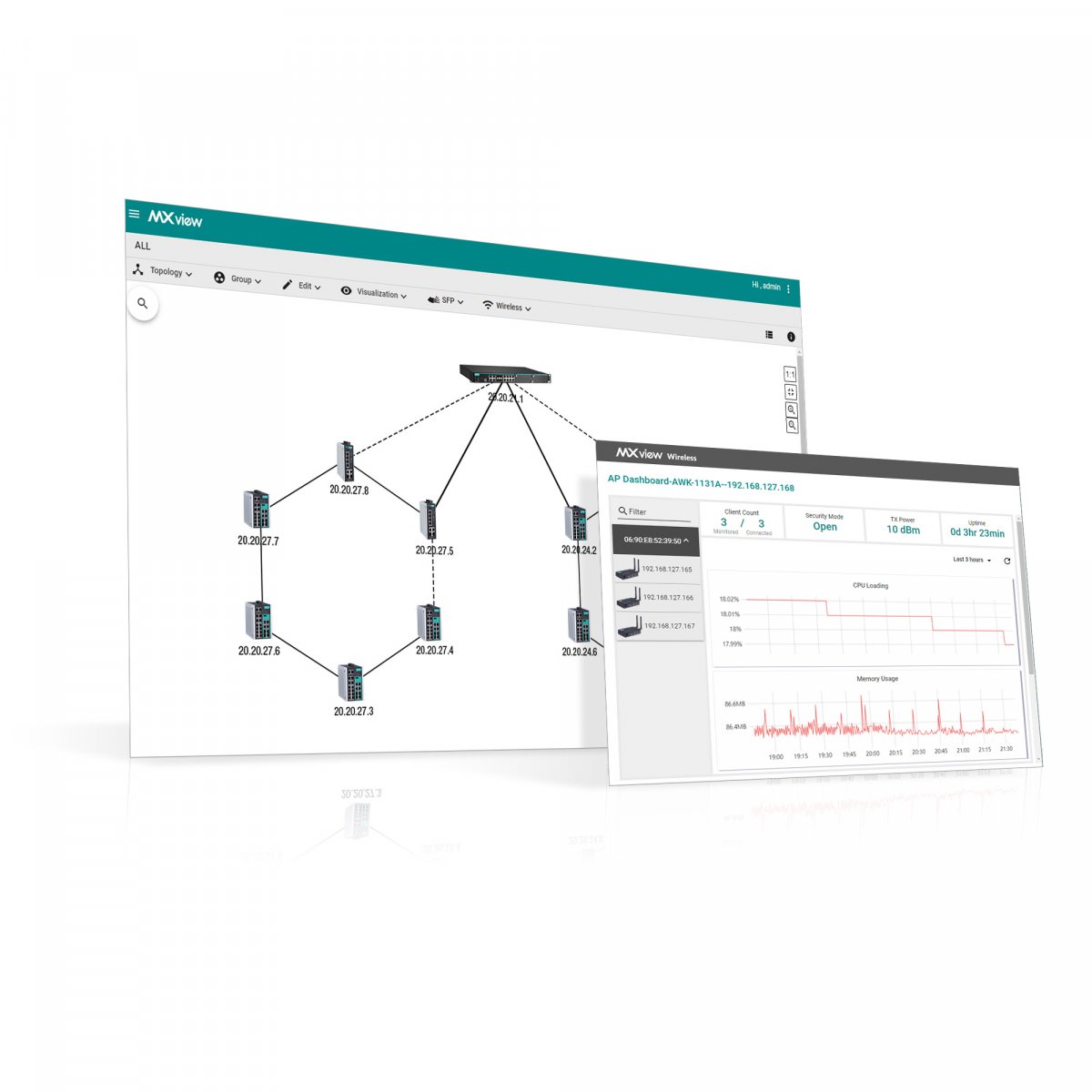
Moxa, a leading provider of network infrastructure solutions, is launching the MXview Wireless add-on module for its industrial network management software, MXview. MXview streamlines network management by visualizing networks, which makes operations easier for non-IT staff and helps improve network availability.
This software is used successfully by many customers around the world, in a variety of sectors such as energy, intelligent transportation and manufacturing. Today, with the rise of smart manufacturing, intelligent and reliable communication over industrial networks has become the cornerstone of almost every smart application. In response to the transformation of the industrial environment and the growing number of Wi-Fi applications, the new MXview Wireless add-on module meets the diverse needs of static and dynamic wireless applications used in smart manufacturing. With reliable communications and real-time network management from a single screen, business leaders can focus on operational performance, counting on maximum system availability.
Visualizing Wi-Fi networks for optimal operational performance
Intelligent process control is a typical static wireless application in smart manufacturing, where users rely on Wi-Fi for communications between the various clients on the production lines and the control center. However, an unstable wireless connection can lead to poor decisions due to incomplete information or interrupted connections on site, which can affect the optimization of production processes. It can often be difficult to know the exact state of the Wi-Fi connection and to solve problems as soon as they occur. The MXview Wireless add-on module simplifies network management by providing users with detailed information and performance graphs for the various access points and clients from a single dashboard.
?One of the major advantages of this module is that it allows users to view the status of wireless and wired networks in the same dashboard. This feature not only makes it possible to quickly grasp the status of the plant network, but also makes it easier to manage,? explains Lyra Li, Product Manager at Moxa. In addition, users can track connectivity patterns and customize alert settings to be notified immediately when a problem occurs. Engineers can thus carry out on-site troubleshooting quickly and efficiently, which guarantees maximum network availability.
Easy troubleshooting for maximum system availability
In automated material handling systems, Wi-Fi connections must be able to adapt dynamically to the fact that vehicles are constantly moving. An unstable wireless signal can easily disrupt the operation of such systems. However, wireless connections are invisible and can be affected by many different factors. The MXview Wireless add-on module provides a dynamic topology view, which shows the status of wireless links and connection changes at a glance. In addition, since automated vehicles move and constantly switch from one access point to another within the facility, users can overlay the network topology on the facility floor plan to easily locate a vehicle by simply checking the wireless connection of its client. This saves precious time when a faulty client needs to be identified and located. ?The roaming playback function allows users to review a client's roaming history over the last 30 days, in order to reproduce an incident. Users can use this function to identify and address the root cause more efficiently, without having to consolidate and examine the logs of each device,? explains Lyra Li. Developed exclusively by Moxa, these two functions have been specially designed to meet the growing needs of automated factories, smart logistics and other smart applications.
Highlights of MXview and the MXview Wireless add-on module
- Automatically discovers and visualizes network devices and physical connections
- Instant alerts with customizable trigger thresholds
- Easy to integrate into operational and IT systems (OT/IT)
- Single integrated dashboard to visualize the status of wired and wireless networks
- Detailed information on individual devices and performance indicator dashboards
- Dynamic topology view showing the status of wireless links and connection changes at a glance
- Visual, interactive roaming playback function for replaying and examining the roaming history of clients